
Firmware
Detalii →Factory Installed Printer Emulations
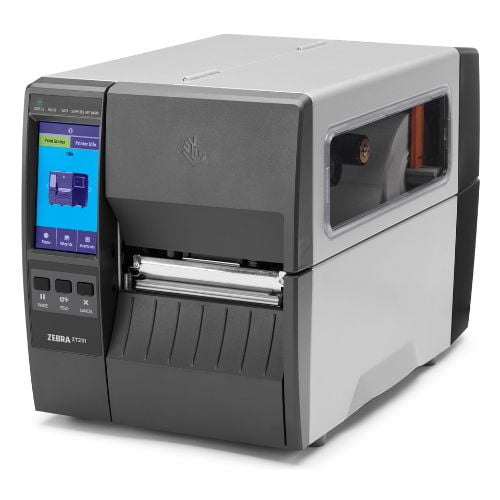
Printer Emulations are on-printer apps that allow this printer to use a variety of printer command languages. Use only on printers that have been updated to Link-OS 7.6 or later.
Folosim cookie-uri necesare pentru functionarea magazinului si, cu acordul tau, cookie-uri pentru analiza, preferinte si marketing. Poti accepta toate, refuza cookie-urile optionale sau personaliza alegerea.
Drivere, documentație, tutoriale, depanare și produse compatibile pentru modelul selectat.
Asistentul AI poate să greșească. Consultă un tehnic AutoID.
The Setup guidelines below will take you to English documentation. You can access the localized User Guides in the DOCUMENTATION tab. IMPORTANT! Do not connect your printer to a computer yet! If you connected your printer to a computer via USB before driver installation, the printer might appear as an unknown (unspecified) device in “Devices and Printers.” If necessary, follow these recovery steps before proceeding to Step 1. 1. Download and install the recommended Windows Printer Driver v10. Download the driver from the DOWNLOADS tab.Follow the instructions for Installing the Drivers and Running the Printer Installation Wizard. 2. Connect the printer. Connect the printer to a USB port on your computer.Connect the printer to your wireless network (Wi-Fi).Connect the printer to your network through the Ethernet port. 3. Load media (media usually means labels, but it also includes tag stock, receipt paper, and other things that can be printed on). You can watch the English video. Some non-English videos are available in the VIDEOS tab.The media settings must match the actual media that you are using. How to identify the media type 4. When using thermal transfer media, load the ribbon You can watch the English video. Some non-English videos are available in the VIDEOS tab.How to find out if you have thermal transfer media? Do a media scratch test.This printer uses a ribbon coated with ink on the outside. How to find out which side of the ribbon is coated? Perform an adhesive test or a ribbon scratch test 5. Print a test label. 6. Calibrate ribbon and media sensors. When changing the size or type of media. If printing issues are observed, such as skipped labels, vertical image/label drift, or ribbon out or media out errors.You can watch the English video. Some non-English videos are available in the VIDEOS tab. 7. The printer settings must match the actual supplies that you are using for your print job and the options on your printer. Adjust the printer settings as necessary using Zebra Setup Utilities software or Windows Printer Driver v8.
Resursele oficiale asociate modelului păstrează versiunea și destinația publicată de producător.
Vezi toate downloads →Printer Emulations are on-printer apps that allow this printer to use a variety of printer command languages. Use only on printers that have been updated to Link-OS 7.6 or later.
OPERATING SYSTEM versions: Windows 10/11, Windows Server 2019/2022/2025For Windows operating systems running on machines with x86 / x64 or Arm processors.
OPERATING SYSTEM versions: Windows 10/11, Windows Server 2019/2022/2025 For Windows running on machines with x86 / x64 processors. The driver does not support Windows running on devices with Arm processors.
Use this software to configure your printer after Printer Driver installation.
Manuale, ghiduri, datasheet-uri și cataloage tehnice asociate modelului.
Vezi toată documentația →Resursă oficială Zebra pentru ZT231: Information about CUPS Driver for label printers.
Tutoriale și proceduri video asociate modelului, inclusiv resurse oficiale Zebra.
Vezi toate videoclipurile →Articole tehnice în limba română asociate modelului.
Vezi toate articolele →Resursă oficială Zebra pentru ZT231: Downloading the Printer Spare Parts List.
This article shows how to identify the DPI of the printhead using the printer's part number.
This article provides a brief description of the ZT200 Series Printers while providing solutions to solve certain issues related to the ribbon.
This article describes steps for setting up a new EU RED compliant Zebra printers in the EMEA region.
This article provides some tips and best practices to resolve VOIDs and improper RFID tag encoding for ZT200 RFID Series, ZT400 RFID Series and ZT600 RFID Series printers.
Aplicații și instrumente oficiale care pot completa funcționalitatea acestui model.
Vezi toate aplicațiile →Remote management of Zebra Print DNA capable printers directly from your AirWatch environment.
For developers to quickly add USB or Network based printing support to browser-based apps on Windows 7, Windows 10 and Mac OSX systems (completion of a brief form is required to access this tool).
WML and XML examples that demonstrate the capabilities of popular Zebra printer software programs.
Makes creating powerful apps simple and straightforward for Zebra Print DNA capable printers and ZC family of card printers.
Add-on profile for Zebra Print DNA capable printers to connect directly to a Rockwell® PLC (completion of a brief form is required to access this tool).
Enables PDF document printing directly from ERP systems to Zebra Print DNA capable printers.
Makes it simple for developers to add label and receipt printing to Android solutions (completion of a brief form is required to access this tool).
Printer Emulations are on-printer apps that allow Print DNA capable printers to use a variety of printer command languages.
Remote management of Print DNA capable printers from your device browser.
These reference files demonstrate how you can easily fine-tune printer security on Zebra Print DNA capable printers.
Firmware Download Utility to upload Printer OS, firmware and service packs to your barcode label printer (see release note for supported printers).
Recommended Printer Configuration Utility for barcode label printers (see release note for supported printers).
Recommended Printer Configuration Utility for barcode label printers (see release note for supported printers).
Read detailed information on the end of service for ZebraDesigner version 2 editions.
ZebraDesigner version 3.3 supports the migration to Thales licensing, and to activate the Professional edition, your license must be the Customer ID and License Key combination 18-digit license numbers starting 3467 cannot be activated in this version of ZebraDesigner. Both the FREE ZebraDesigner Essentials 3 and PAID ZebraDesigner Professional 3 editions will be installed. The application will initially run as the free Essentials edition. At any time, you may choose to start a 30-day trial of the Professional edition or activate a purchased license key. After the 30-day trial has expired, the software will revert to the free Essentials edition Purchase an Activation License Key
Windows-based design tool for developing customized label templates to fit specific use cases and Zebra printers.
Remote management of Zebra printers from a single PC screen.
ZT23142-T0E000FZZebra ZT231 ZT23142-T0E000FZ - imprimanta de etichete, transfer termic, rezolutie: 8 puncte/mm (203 dpi), Tear (rupere), latime suport (max.): 114 mm, latime tiparire (max.): 10…
ZT23143-T0E000FZZebra ZT23143-T0E000FZ - imprimanta de etichete, transfer termic, rezolutie: 12 puncte/mm (300 dpi), latime suport (max.): 114 mm, latime tiparire (max.): 104 mm, diametru rola …
ZT23142-T0EC00FZZebra ZT231 ZT23142-T0EC00FZ - imprimantă de etichete, transfer termic, 8 puncte/mm (203 dpi), lățime suport (max.): 114 mm, lățime tipărire (max.): 104 mm, diametru rola (max.)…
ZT23143-T3E000FZZebra ZT231 ZT23143-T3E000FZ - imprimanta de etichete, transfer termic, rezolutie: 12 puncte/mm (300 dpi), latime suport (max.): 114 mm, latime tiparire (max.): 104 mm, diametru…
ZT23142-D0E000FZZebra ZT231 ZT23142-D0E000FZ - imprimanta de etichete, industriala, termica directa, rezolutie: 8 puncte/mm (203 dpi), latime suport (max.): 114 mm, latime tiparire (max.): 104 …
ZT23142-T3E000FZZebra ZT231 ZT23142-T3E000FZ - imprimanta de etichete, transfer termic, rezolutie: 8 puncte/mm (203 dpi), latime suport (max.): 114 mm, latime tiparire (max.): 104 mm, diametru …
ZT23142-D3E000FZZebra ZT23142-D3E000FZ - imprimantă de etichete, termică directă, rezoluție: 8 puncte/mm (203 dpi), lățime suport (max.): 114 mm, lățime tipărire (max.): 104 mm, diametru rolă (…
ZT23143-T2E000FZZebra ZT231 ZT23143-T2E000FZ - imprimantă de etichete, transfer termic, 12 puncte/mm (300 dpi), lățime suport (max.): 114 mm, lățime tipărire (max.): 104 mm, diametru rolă (max.…
ZT23143-T0EC00FZZebra ZT23143-T0EC00FZ - imprimanta de etichete, transfer termic, rezolutie: 12 puncte/mm (300 dpi), latime suport (max.): 114 mm, latime tiparire (max.): 104 mm, diametru rola …
ZT23143-D0E000FZZebra ZT231 ZT23143-D0E000FZ - imprimantă de etichete, termică directă, 12 puncte/mm (300 dpi), lățime suport (max.): 114 mm, lățime tipărire (max.): 104 mm, diametru rola (max.…
ZT23143-T1E000FZZebra ZT23143-T1E000FZ - imprimantă de etichete, transfer termic, rezoluție: 12 puncte/mm (300 dpi), lățime suport (max.): 114 mm, lățime tipărire (max.): 104 mm, diametru rolă …
ZT23142-T1E000FZZebra ZT231 ZT23142-T1E000FZ - imprimantă de etichete, transfer termic, 8 puncte/mm (203 dpi), lățime suport (max.): 114 mm, lățime tipărire (max.): 104 mm, diametru rolă (max.)…
ZT23142-D0EC00FZZebra ZT23142-D0EC00FZ - imprimantă de etichete, termică directă, rezoluție: 8 puncte/mm (203 dpi), lățime suport (max.): 114 mm, lățime tipărire (max.): 104 mm, diametru rolă (…
ZT23142-D1E000FZZebra ZT231 ZT23142-D1E000FZ - imprimantă de etichete, termică directă, 8 puncte/mm (203 dpi), lățime suport (max.): 114 mm, lățime tipărire (max.): 104 mm, diametru rolă (max.)…
ZT23143-D3E000FZZebra ZT231 ZT23143-D3E000FZ - imprimantă de etichete, termică directă, 12 puncte/mm (300 dpi), lățime suport (max.): 114 mm, lățime tipărire (max.): 104 mm, diametru rola (max.…
ZT23142-T2E000FZZebra ZT231 ZT23142-T2E000FZ - imprimantă de etichete, transfer termic, 8 puncte/mm (203 dpi), lățime suport (max.): 114 mm, lățime tipărire (max.): 104 mm, diametru rolă (max.)…
ZT23142-D2E000FZZebra ZT231 ZT23142-D2E000FZ - imprimantă de etichete, termică directă, 8 puncte/mm (203 dpi), lățime suport (max.): 114 mm, lățime tipărire (max.): 104 mm, diametru rola (max.)…
P1123335-057Kit cap imprimare Zebra 300 dpi P1123335-057 compatibil ZT111/211/231. Calitate superioară, durabilitate și instalare rapidă.
P1037974-061Zebra P1037974-061 - Kit, angrenaje de antrenare, pentru toate Imprimantele ZT111, ZT211, ZT231 și numai Imprimantele ZT210, ZT220 și ZT230 cu numere de serie mai mari decât 52J…
P1037974-028Zebra P1037974-028 - Kit, Platen Roller, ZT210, ZT220, ZT230, ZT111, ZT211, ZT231
P1037974-039P1037974-039 Rolă de kit Zebra pentru unitatea de exfoliere seria, ZT210, ZT220, ZT230, ZT111, ZT211, ZT231
46637Cablu de alimentare UK Zebra 46637 este un cablu de inalta calitate, perfect pentru dispozitivele Zebra si pentru utilizatorii care locuiesc in Regatul Unit.
P1083320-037CKit placă Wireless Zebra pentru seriile ZT600, ZT510, ZT411/ZT421, asigură conectivitate 802.11ac și BT4.2 pentru imprimare eficientă.
P1123335-042Kit Peel Upgrade Zebra P1123335-042 pentru ZT111/ZT211/ZT231, automatizează desprinderea etichetelor, îmbunătățește eficiența imprimării și productivitatea.
P1037974-027Suport Media Zebra ZT200 P1037974-027 pentru imprimantele ZT210, ZT220, ZT230, ZT111, ZT211, ZT231. Optimizează alimentarea media, ideal pentru medii industriale și comerciale.
79830MKit ax alimentare ribon Zebra 79830M pentru imprimante ZT410, ZT411, ZT111, ZT211 și ZT231. Asigură alimentarea ribonului cu cerneală aplicată pe interior.
46629Cablu de alimentare EU Zebra 46629, este proiectat pentru a alimenta dispozitive electronice in UE. Durabil si rezistent, este compatibil cu o gama larga de dispozitive.
P1037974-040Kit PCB Ribon Zebra P1037974-040, pentru ZT230/ZT231. Include PCB, motor și ax, asigurând funcționarea optimă a derulării ribonului în medii industriale.
P1123335-041Kit Upgrade Cutter Zebra P1123335-041 pentru ZT111/ZT231, îmbunătățește tăierea automată a etichetelor, ideal pentru aplicații industriale de mare volum.
P1123335-022Kit, Power Supply, ZT231
P1123335-012Cap de printare Zebra P1123335-012, 203 DPI: calitate superioară, durabilitate extinsă și compatibilitate perfectă cu modelele ZT111, ZT211 și ZT231 pentru aplicații industriale…
P1123335-013Cap de printare Zebra P1123335-013, 300 DPI: calitate superioară, durabilitate extinsă și compatibilitate perfectă cu modelele ZT111, ZT211 și ZT231 pentru aplicații industriale…
P1123335-036Kit Media Dancer Zebra P1123335-036 pentru ZT111, ZT211, ZT231 - Menține tensiunea constantă a materialului de imprimare, ideal pentru imprimare de mare volum și medii industriale.
P1123335-017Kit conversie Zebra P1123335-017: transformare de la 203 DPI la 300 DPI pentru ZT111, ZT211 și ZT231, oferind flexibilitate și calitate superioară a imprimării.
P1123335-025Kit interfață aplicator Zebra P1123335-025 pentru ZT231. Integrare eficientă în sisteme automate de etichetare, ideal pentru medii industriale și de producție.
P1123335-035Kit placă Ethernet Zebra P1123335-035, îmbunătățește conectivitatea imprimantelor ZT111, ZT211, ZT231, integrare eficientă în rețele IT.
P1123335-030Zebra P1123335-030 – senzor media pentru ZT111, ZT211, ZT231. Asigură alinierea precisă a etichetelor și imprimare fără erori.
P1123335-033Kit senzor Zebra P1123335-033 Take Label pentru ZT111/ZT211/ZT231. Detectează preluarea etichetei pentru control precis al imprimării.
P1123335-046Kit ambalaj Zebra P1123335-046 pentru imprimante ZT111, ZT211, ZT231. Protecție sigură la transport, ideal pentru reexpediere și service.
P1123335-018Kit conversie Zebra P1123335-018: transformare de la 300 DPI la 203 DPI pentru ZT111, ZT211 și ZT231, oferind flexibilitate și calitate superioară a imprimării.
P1123335-034Kit motor Zebra P1123335-034 pentru sistemul de antrenare ZT111, ZT211, ZT231. Piesă originală pentru reparații rapide și fiabile.
P1123335-020Zebra P1123335-020 – placă de bază pentru ZT231. Control total al imprimantei, compatibilitate completă și fiabilitate industrială.
P1037974-053Antena Wi-Fi Zebra P1037974-053 pentru înlocuire și îmbunătățirea conectivității wireless, compatibilă cu o gamă largă de imprimante Zebra, inclusiv ZT411, ZT421, ZE511, ZE521.
P1037974-051Kit ax preluare ribbon Zebra pentru seriile ZT210, ZT220, ZT230, ZT111, ZT211, ZT231. Asigură preluarea eficientă a ribbonului pentru o imprimare continuă și fiabilă.
37609Zebra 37609 – cablu alimentare detașabil 2m, standard Japonia. Compatibil cu surse Zebra, ideal pentru imprimante și echipamente profesionale.
46693Zebra 46693 – cablu de alimentare detașabil, 79 inch (2 metri), compatibil cu surse de alimentare Zebra. Soluție fiabilă pentru conectare rapidă.
P1037974-034Zebra P1037974-034 – kit capac electronic pentru ZT210/ZT230/ZT211/ZT231. Protejează componentele interne. Original Zebra. Disponibil pe AutoID.ro.
P1123335-047Kit ambalare Zebra P1123335-047 pentru ZT231 cu Liner Take-Up. Protecție completă la transport pentru imprimante industriale Zebra.
P1123335-037Zebra P1123335-037 – kit ansamblu ghidaj media pentru ZT111/ZT211/ZT231. Asigură alinierea precisă a etichetelor pentru imprimare fără erori.
P1037974-050Zebra P1037974-050 – ax ribon original pentru ZT210/ZT220/ZT230/ZT111/ZT211/ZT231. Piesă OEM pentru derulare corectă ribon. AutoID.ro
P1123335-016Zebra P1123335-016 – bară de presiune (Toggle Bar) pentru ZT111, ZT211, ZT231. Asigură imprimare uniformă și aliniere perfectă a media.
P1123335-038Zebra P1123335-038 – bară de rupere originală pentru ZT111/ZT211/ZT231. Asigură desprinderea curată a etichetelor imprimate.
P1123335-028Kit Zebra P1123335-028 – cabluri electronice pentru ZT111, ZT211, ZT231. Conectivitate internă fiabilă pentru reparații și service profesional.
P1123335-019Zebra P1123335-019 – capac acces rola platen pentru ZT111, ZT211, ZT231. Acces facil pentru întreținere și protecție durabilă.
P1123335-043Kit Zebra P1123335-043 cu capac și placă electronică pentru cutter ZT111/ZT211/ZT231. Protecție și control pentru funcționarea sigură a tăierii automate.
P1123335-008Zebra P1123335-008 – capac media original pentru ZT211 și ZT231. Protejează consumabilele și menține funcționarea imprimantei în siguranță.
P1123335-029Zebra P1123335-029 – Kit capace pentru opțiuni neutilizate ZT111, ZT211, ZT231. Protecție și finisaj profesional pentru imprimante industriale.
P1123335-040Zebra P1123335-040 – kit carcasă rola platen pentru ZT111, ZT211, ZT231. Protecție esențială pentru funcționarea corectă a mecanismului de imprimare.
P1037974-015Kit, Ground Contact, ZT210, ZT220, ZT230, ZT111, ZT211, ZT231
P1123335-050Kit documentație Zebra P1123335-050 pentru ZT111, ZT211, ZT231. Include manuale, ghiduri și informații esențiale pentru instalare și întreținere.
P1123335-048Kit hardware Zebra P1123335-048 cu șuruburi și șaibe pentru ZT111, ZT211, ZT231. Soluție completă pentru reparații și montaj sigur.
P1123335-011Kit Zebra P1123335-011 – fereastră media pentru ZT111/ZT211/ZT231. Monitorizare rapidă a etichetelor fără a deschide imprimanta.
P1123335-027Kit RFID Zebra P1123335-027 pentru imprimanta ZT231. Înlocuire hardware RFID original, compatibil 100%, ideal pentru aplicații de trasabilitate.
P1123335-015Zebra P1123335-015 – kit mecanism imprimare direct thermal pentru ZT111, ZT211, ZT231. Soluție completă pentru reparații și întreținere.
P1123335-014Kit mecanism imprimare transfer termic Zebra P1123335-014 pentru ZT111, ZT211, ZT231. Piesă originală pentru reparații și upgrade profesional.
P1037974-012Zebra P1037974-012 - set 2 miezuri ribon pentru imprimante ZT210/ZT220/ZT230/ZT111/ZT211/ZT231. Piese originale Zebra, disponibile la AutoID.ro.
P1123335-005Zebra P1123335-005 – panou de control original pentru ZT231. Afișaj LCD și butoane pentru operare ușoară și acces rapid la funcții.
P1123335-010Zebra P1123335-010 – panouri frontale inferioare pentru ZT111/ZT211/ZT231. Protejează și oferă finisaj profesional imprimantei tale Zebra.
P1037974-036Zebra P1037974-036 – perie antistatică pentru cutter, compatibilă cu ZT210/ZT220/ZT230/ZT111/ZT211/ZT231. Accesoriu OEM Zebra. AutoID.ro
P1123335-049Kit Zebra P1123335-049 cu 20 piciorușe pentru ZT111, ZT211, ZT231. Asigură stabilitate și protecție imprimantei în medii industriale.
P1037974-066Kit, Ribbon Strip Plate and Ribbon Static Brush, ZT210, ZT220, ZT230, ZT111, ZT211, ZT231
P1123335-009Kit placă superioară Zebra P1123335-009 pentru ZT211/ZT231. Piesă structurală originală pentru rezistență și reparații de durată.
P1123335-032Kit senzor Zebra P1123335-032 Head Open pentru ZT111/ZT211/ZT231. Detectează deschiderea capului și oprește imprimarea pentru siguranță.
P1123335-031Zebra P1123335-031 – senzor ribbon original pentru ZT111/ZT211/ZT231. Detectare precisă pentru imprimare termică fără întreruperi.
P1123335-039Kit Zebra P1123335-039 – sistem ribbon pentru ZT111 și ZT231. Ideal pentru înlocuiri și reparații în imprimante cu transfer termic.
P1037974-037Zebra P1037974-037 – tavă colectare etichete pentru cutter, compatibilă ZT210/220/230/111/211/231. Accesoriu original Zebra, pe AutoID.ro
P1123335-045Kit Zebra P1123335-045 – ușă cu panouri laterale pentru sistem Liner Take-Up, ZT231. Finisaj profesional și protecție completă.
P1123335-044Kit, Peel Assembly, ZT111, ZT211, ZT231
Z1AE-ZT231-3C0Zebra OneCare 3 ani pentru ZT231, TAT 3 zile, cu acoperire completă, suport Return to Depot.
Z1BE-ZT231-3C0Zebra OneCare 3 ani ZT231, TAT 3 zile, cu acoperire completă, service Return to Depot.
Z1AE-ZT231-500Zebra OneCare 5 ani pentru ZT231, TAT 3 zile, fără acoperire daune, service Return to Depot.
Z1AE-ZT231-5C0Zebra OneCare 5 ani pentru ZT231, TAT 3 zile, cu acoperire completă, service Return to Depot.
Z1AS-ZT231-5C0Zebra OneCare Select 5 ani ZT231 – service complet cu înlocuire avansată Zebra. Valabil în EMEA/APAC pentru echipamente noi.
Z1A1-ZT231-1C0Zebra OneCare 1 an pentru ZT231, suport OnSite NBD cu acoperire completă, valabil în NA & Europa.
Z1A2-ZT231-1C0Zebra OneCare 1 an pentru ZT231, OnSite în 2 zile, acoperire completă, valabil în NA și Europa.
Z1B2-ZT231-100Zebra OneCare 1 an pentru ZT231, suport OnSite în 2 zile, valabil în NA și Europa selectivă.
Z1BE-ZT231-100Zebra OneCare 1 an pentru ZT231, TAT 3 zile, suport standard fără acoperire daune.
Z1BE-ZT231-1003Zebra OneCare Essential 1 an ZT231 – suport de bază cu TAT 3 zile, configurare inclusă. Disponibil doar pentru minimum 5 unități.
Z1BE-ZT231-1C0Zebra OneCare 1 an pentru ZT231, TAT 3 zile, acoperire completă, service Return to Depot.
Z1BE-ZT231-1C03Zebra OneCare 1 an pentru ZT231, acoperire completă, commissioning inclus, TAT 3 zile, MOQ 5.
Z1R1-ZT231-100Zebra OneCare 1 an pentru ZT231, reînnoire OnSite NBD, fără daune, valabil în NA și Europa selectivă.
Z1R1-ZT231-1C0Reînnoire Zebra OneCare 1 an pentru ZT231, OnSite NBD, cu acoperire completă, valabil în NA & Europa.
Z1R2-ZT231-100Reînnoire 1 an Zebra OneCare pentru ZT231, suport OnSite în 2 zile, fără daune incluse.
Z1R2-ZT231-1C0Reînnoire Zebra OneCare 1 an pentru ZT231, cu acoperire completă și intervenție OnSite în 2 zile.
Z1RE-ZT231-100Reînnoire Zebra OneCare 1 an pentru ZT231, cu TAT 3 zile și suport non-comprehensive.
Z1RE-ZT231-1003Zebra OneCare 1 an reînnoire pentru ZT231, cu commissioning și TAT 3 zile, fără daune, MOQ 5.
Z1RE-ZT231-1C0Reînnoire 1 an Zebra OneCare pentru ZT231. Acoperire completă, TAT 3 zile, suport profesional rapid.
Z1RE-ZT231-1C03Zebra OneCare 1 an cu commissioning, TAT 3 zile și acoperire completă. Reînnoire pentru ZT231, MOQ 5.
Z1R1-ZT231-200Reînnoire Zebra OneCare 2 ani pentru ZT231, cu suport OnSite NBD, fără acoperire daune.
Z1R1-ZT231-2C0Zebra OneCare 2 ani pentru ZT231, reînnoire OnSite NBD cu acoperire completă, valabil în NA și Europa.
Z1R2-ZT231-200Reînnoire Zebra OneCare 2 ani pentru ZT231 cu suport OnSite în 2 zile, fără daune incluse.
Z1R2-ZT231-2C0Reînnoire Zebra OneCare 2 ani pentru ZT231, OnSite în 2 zile, cu acoperire completă.
Z1RE-ZT231-200Reînnoire suport Zebra OneCare 2 ani pentru ZT231. TAT 3 zile, fără daune acoperite, fiabil și eficient.
Z1RE-ZT231-2003Zebra OneCare 2 ani cu commissioning, TAT 3 zile, fără daune. Reînnoire pentru ZT231, MOQ 5.
Z1RE-ZT231-2C0Zebra OneCare 2 ani pentru ZT231, cu acoperire completă și TAT 3 zile. Reînnoire ideală pentru suport continuu.
Z1RE-ZT231-2C03Zebra OneCare 2 ani cu acoperire completă, commissioning și TAT 3 zile. Reînnoire pentru ZT231, MOQ 5.
Z1A1-ZT231-300Zebra OneCare 3 ani cu suport OnSite NBD pentru ZT231, fără daune incluse, disponibil în NA & Europa.
Z1A1-ZT231-3C0Zebra OneCare 3 ani pentru ZT231, OnSite NBD, cu acoperire completă, valabil în NA, UK, IE, Benelux.
Z1A2-ZT231-300Zebra OneCare 3 ani pentru ZT231, suport OnSite în 2 zile, fără acoperire daune, valabil NA & Europa.
Z1A2-ZT231-3C0Zebra OneCare 3 ani cu intervenție OnSite în 2 zile, acoperire completă. Valabil pentru ZT231.
Z1AE-ZT231-300Zebra OneCare 3 ani pentru ZT231, TAT 3 zile, service standard fără acoperire daune, non-comprehensive.
Z1AE-ZT231-3003Serviciu Zebra OneCare Essential 3 ani pentru ZT231. TAT 3 zile, commissioning inclus, MOQ 5.
Z1AE-ZT231-3C03Zebra OneCare 3 ani cu commissioning, TAT 3 zile și acoperire completă. Valabil pentru ZT231, MOQ 5.
Z1B1-ZT231-300Zebra OneCare 3 ani pentru ZT231, OnSite NBD, fără daune, valabil în NA, UK, IE, Benelux.
Z1B1-ZT231-3C0Zebra OneCare 3 ani ZT231, OnSite NBD, cu acoperire completă, valabil NA, UK, IE, Benelux.
Z1B2-ZT231-300Zebra OneCare 3 ani pentru ZT231, suport OnSite în 2 zile, fără acoperire daune, valabil NA & Europa selectivă.
Z1B2-ZT231-3C0Zebra OneCare 3 ani pentru ZT231 cu acoperire completă și intervenție OnSite în 2 zile, valabil în NA & Europa.
Z1BE-ZT231-300Zebra OneCare 3 ani pentru ZT231, TAT 3 zile, service Return to Depot fără acoperire daune.
Z1BE-ZT231-3003Zebra OneCare Essential 3 ani ZT231 – service non-comprehensiv cu TAT 3 zile și commissioning. Valabil doar pentru MOQ 5 unități.
Z1BE-ZT231-3C03Zebra OneCare 3 ani cu acoperire completă și commissioning. TAT 3 zile, valabil pentru ZT231, MOQ 5.
Z1AE-ZT231-5003Zebra OneCare 5 ani cu commissioning și TAT 3 zile, fără daune incluse. Valabil pentru ZT231, MOQ 5.
Z1AE-ZT231-5C03Zebra OneCare 5 ani ZT231, cu acoperire completă, TAT 3 zile și commissioning. Valabil cu MOQ 5.
Z1A1-ZT231-100Zebra OneCare 1 an pentru ZT231, suport OnSite NBD, fără acoperire daune, valabil în NA & Europa.
Z1A2-ZT231-100Zebra OneCare OnSite 1 an ZT231 – intervenție la sediu în a doua zi lucrătoare, non-comprehensiv, valabil în NA, UK, IE, Benelux.
Z1B1-ZT231-100Suport profesional OnSite 1 an pentru imprimanta Zebra ZT231. Intervenție rapidă, acoperire în regiuni selectate.
Z1B1-ZT231-1C0Zebra OneCare 1 an ZT231, OnSite NBD, cu acoperire completă, valabil în NA, UK, IE, Benelux.
Z1B2-ZT231-1C0Zebra OneCare OnSite 1 An ZT231 – service complet la sediu în a doua zi lucrătoare. Valabil pentru echipamente achiziționate după 30 zile.
Z1BS-ZT231-100Zebra OneCare Select 1 an cu înlocuire avansată, fără daune, valabil EMEA/APAC, pentru imprimanta ZT231.
Z1BS-ZT231-1C0Zebra OneCare Select 1 an pentru ZT231, înlocuire avansată, acoperire completă, valabil EMEA/APAC.
Z1RS-ZT231-100Reînnoire Zebra OneCare Select 1 an cu înlocuire avansată, fără daune, valabil în EMEA/APAC.
Z1RS-ZT231-1C0Zebra OneCare Select 1 An ZT231 – înlocuire avansată din stoc Zebra. Serviciu complet pentru EMEA/APAC. Plan de reînnoire, acoperire totală.
Z1RS-ZT231-200Zebra OneCare Select 2 ani pentru ZT231, reînnoire fără daune, cu înlocuire avansată EMEA/APAC.
Z1RS-ZT231-2C0Reînnoire Zebra OneCare Select 2 ani pentru ZT231, cu înlocuire avansată și acoperire completă.
Z1AS-ZT231-300Zebra OneCare Select 3 ani pentru ZT231, înlocuire avansată fără daune, valabil în EMEA/APAC.
Z1AS-ZT231-3C0Zebra OneCare Select 3 ani ZT231, înlocuire avansată cu acoperire completă, valabil în EMEA/APAC.
Z1BS-ZT231-300Zebra OneCare Select 3 ani pentru ZT231, înlocuire avansată, fără daune, valabil EMEA/APAC.
Z1BS-ZT231-3C0Zebra OneCare Select 3 ani pentru ZT231, cu înlocuire avansată, acoperire completă și disponibilitate EMEA/APAC.
Z1AS-ZT231-500Zebra OneCare Select 5 ani pentru ZT231, înlocuire avansată fără acoperire daune, valabil EMEA/APAC.
SW-NUCLEUS-1YRSW-NUCLEUS-1YR este licența Zebra Nucleus pentru 1 an, per dispozitiv Zebra eligibil. Include licență software și Standard Service Tech Support.
P1109020Licență Zebra Designer 3 PRO P1109020, software avansat pentru design etichete, suport baze de date și scriptare. Ideal pentru gestionare etichete industriale.
48735-120ZebraNet Bridge Enterprise, gestionare centralizată pentru 100+ imprimante Zebra, eficiență și productivitate crescută, configurare și monitorizare ușoară.
P1109127Licență Zebra Designer PRO 3 P1109127, activare 1 PC, livrare prin e-mail. Software avansat pentru design etichete, suport baze de date și scriptare.
SW-NUCLEUS-5YRSW-NUCLEUS-3YR este licența Zebra Nucleus pentru 3 ani, per dispozitiv Zebra eligibil. Include licență software și Standard Service Tech Support.
SW-NUCLEUS-3YRSW-NUCLEUS-5YR este licența Zebra Nucleus pentru 5 ani, per dispozitiv Zebra eligibil. Include licență software și Standard Service Tech Support.
P1094903Licență Zebra PPME – P1094903, pentru 1–100 imprimante. Gestionare centralizată, licență perpetuă, fără abonament, pentru control complet și sigur.
SW-SOTI-CNCT-CLOUDLicență SOTI Connect Cloud Zebra – 1 dispozitiv, valabilitate 1 lună. Soluție cloud pentru administrare imprimante industriale Zebra.
48734-120ZebraNet Bridge Enterprise 48734-120 – software pentru gestionarea centralizată a 1–100 imprimante Zebra. Administrare de la distanță eficientă și sigură.
48733-120ZebraNet Bridge Enterprise software, gestionează până la 50 imprimante Zebra, configurare și monitorizare centralizată, crește productivitatea și eficiența.
05095BK04045Zebra 05095BK04045 este un ribbon de rășină 5095 High-Performance, negru, cu dimensiunea de 40 mm x 450 m și miez de 25 mm (1 inch). Este destinat imprimării prin transfer termi…
02100BK08945Ribbon Ceară Zebra 02100BK08945, 89mmx450m, 2100. Performanță ridicată pentru imprimante termice. Ideal pentru etichete durabile, ambalare: 12 role/cutie.
04800BK06045Ribbon Rășină Zebra 4800 60mm x 450m, miez 25mm, 12 role/cutie. Rezistență excelentă la abraziune și chimicale. Ideal pentru aplicații industriale și comerciale.
05100BK06045Ribbon rășină Zebra 5100 (05100BK06045), 60mm x 450m, core 25mm - Premium, ideal pentru etichete industriale durabile, 6 role/cutie.
02100BK06045Ribbon Ceară 60mm x 450m 2100 Zebra. Core 25mm. Performanță înaltă pentru imprimante termice. Ideal pentru etichete din hârtie mată sau semi-lucioasă. 12 role/cutie.
02100BK08045Ribbon Ceară Zebra 02100BK08045, 80mm x 450m. Miez 25 mm. Performanță ridicată, text clar, rezistență excelentă. Ideal pentru imprimante Zebra, 12 role/cutie.
03200BK11045Ribbon ceară/rășină Zebra 03200BK11045, 110mm x 450m, performanță ridicată. Core 25mm, 6 role/cutie. Ideal pentru imprimări clare și rezistente.
04800BK08045Ribbon rășină Zebra 04800BK08045, 80mm x 450m, nucleu 25mm. Rezistență excepțională la uzură și chimicale. Ideal pentru imprimări durabile și industriale.
02300BK06045Ribon ceară Zebra 02300BK06045, 60mm x 450m, 5 role/cutie. Ideal pentru imprimarea etichetelor economice pe hârtie mată. Calitate și durabilitate excelente.
76171Etichete hârtie 51 x 25 mm, 76 mm core, Zebra Z-Perform 1000T, Zebra 76171, transfer termic, adeziv permanent, 5180 etichete/rolă, 10 role/cutie. Ideal pentru etichetare industr…
02300BK08345Zebra 02300BK08345 - Ribon de ceară, 83mm x 450m, 2300; Standard, miez de 25 mm, 12/cutie
04800BK04045Ribbon rășină Zebra 04800BK04045, 40mm x 450m, seria 4800. Rezistent la abraziune și chimicale, ideal pentru aplicații industriale. 12 role/cutie.
05095BK08330Ribbon de rășină Zebra 5095, 83mm x 300m, core 25mm, 6 role/cutie, performanță înaltă, rezistență la zgârieturi și substanțe chimice. Ideal pentru etichete durabile în medii sol…
04800BK11005Zebra 04800BK11005 - Sample Ribon de rășină, 110mm x 50m, 4800; Performanță, miez de 25 mm
05095BK08945Ribbon rășină Zebra 5095, 89mm x 450m, core 25mm, 6 role/cutie, performanță înaltă, rezistență la zgârieturi și chimicale - Ideal pentru etichete durabile în logistică și medii …
05100BK04045Ribbon rășină premium Zebra 5100 (05100BK04045) 40mm x 450m, core 25mm, 6 role/cutie, ideal pentru imprimare durabilă pe materiale sintetice.
05095BK11005Sample Ribon Rasina Zebra 05095BK11005, 110mmx50m, core 25 mm, performanță înaltă, rezistență la zgârieturi, ideal pentru imprimare durabilă și condiții dure.
880328-012Etichete sintetice Zebra Z-Ultimate 3000T White 25 x 13 mm, 76mm core, transfer termic, poliester alb lucios, adeziv permanent, ideale pentru aplicații industriale și comerciale…
02100BK11045Ribbon ceară Zebra 2100, 110mm x 450m, miez 25mm, 12 role/cutie. Performanță superioară pentru imprimare clară și rezistentă, ideal pentru aplicații industriale.
02300BK08945Ribbon ceară Zebra 02300BK08945, 89mm x 450m, miez 25mm, ideal pentru imprimante termice. Performanță standard, claritate excelentă, 12 role/cutie. Perfect pentru logistică.
05095BK08345Ribbon Rășină Zebra 5095 (83mm x 450m), core 25mm, 6 role/cutie, pentru imprimare durabilă pe hârtie și materiale sintetice - rezistență la zgârieturi, chimicale și abraziune, i…
3006307-TEtichete hârtie 57 x 32 mm, 76 mm core, Zebra Z-Perform 1000D, Zebra 3006307-T, direct termic, adeziv permanent, 4470 etichete/rola, 8 role/cutie. Ideal pentru etichetare produs…
03200BK04045Ribbon Ceară/Rășină Zebra 3200 - 40mm x 450m, miez 25mm, 6 buc/cutie. Imprimare durabilă pe materiale variate, ideal pentru aplicații industriale și comerciale.
03400BK04045Ribbon ceară/rășină Zebra 03400BK04045, 40mm x 450m, core 25mm, 6 role/cutie, performanță înaltă. Ideal pentru etichete rezistente în medii industriale și comerciale.
880332-025Etichete sintetice Zebra 880332-025, 38 x 25mm, din poliester Z-Ultimate 3000T White, imprimare transfer termic, adeziv permanent, miez 76mm, 10 role/cutie, ideale pentru aplica…
30117463011746 eticheta zebra, poliester, 76x51mm; transfer termic, z-xtreme 5000t alb, adeziv permanent, miez de 76 mm
05095BK11030Ribbon Rășină Zebra 05095BK11030 - 110mm x 300m, core 25mm, performanță ridicată pentru etichete durabile, rezistente la uzură, căldură și chimicale, pachet de 6 role.
02300BK04045Ribon Ceară Zebra 02300BK04045, 40mm x 450m, core 25 mm, pentru imprimare termică. Oferă claritate excelentă pentru text și coduri de bare, ideal pentru etichete de hârtie.
02300BK11045Ribbon Ceară 110mm x 450m Zebra 02300BK11045, standard, miez 25mm, ambalare 12 role/cutie. Ideal pentru imprimante termice Zebra și etichete de calitate superioară.
03400BK11045Ribbon Ceară/Rășină Zebra 3400, 110mm x 450m, core 25mm. Rezistent și durabil, ideal pentru aplicații industriale. Ambalaj 6 bucăți. Imprimare de calitate superioară.
3017015Etichete sintetice CryoCool 8100T Zebra (3017015), 51 x 25 mm, core 25 mm, poliester, adeziv permanent, rezistente la temperaturi extrem de scăzute de până la -196°C, ideale pen…
02300BK11030Ribbon de ceară Zebra 02300BK11030 (110mm x 300m, 25mm core). Performanță optimă pentru imprimarea pe hârtie, ideal pentru aplicații în retail și logistică.
01600BK11045Rola de ceara 110mmx450m (4.33inx1476ft) 1600 Economy de la Zebra este proiectata pentru a oferi cea mai buna calitate pentru coduri de bare, text si grafica. Acestea sunt compa…
05095BK11045Resin Ribbon, 110mmx450m (4.33inx1476ft), 5095; High Performance, 25mm (1in) core, 6/box
02300BK10245Ribbon Ceară 102mm x 450m Zebra 2300, standard, performanță ridicată. 12 role/cutie, ideal pentru coduri de bare clare și precise. Miez 25mm.
04800BK11045Ribbon Rășină Zebra 04800BK11045 - 110mm x 450m, core 25mm, serie 4800, rezistent la abraziune și chimicale, ideal pentru etichete industriale durabile, set de 12 role.
87809Etichete hârtie 102x152mm, 76mm core, Z-Perform 1000D, Zebra 87809, direct termic, hârtie neacoperită, adeziv permanent, ideale pentru etichetare cutii și expediere. 950 etichet…
800132-202Ribon Rășină Zebra 800132-202, 56mm x 74m, core 12 mm, pentru imprimare termică de înaltă performanță. Rezistent la zgârieturi și substanțe chimice, ideal pentru aplicații indus…
76524Etichete hârtie 148x210mm, 76mm core, Z-Perform 1000T, Zebra 76524, transfer termic, hârtie mată neacoperită, adeziv permanent, ideale pentru etichetare ambalaje și cutii. 700 e…
3005869Etichete hârtie 74 x 210 mm, 76 mm core, Zebra Z-Perform 1000T, Zebra 3005869, transfer termic, adeziv permanent, perforație, 800 etichete/rola, 6 role/cutie. Ideal pentru exped…
03200BK06045Ribbon ceară/rășină Zebra 3200, 60mm x 450m, miez 25mm, 6 role/cutie. Rezistență superioară la abraziune, umiditate și substanțe chimice. Ideal pentru aplicații industriale.
76522Etichete hârtie 76 x 76 mm, 76 mm core, Zebra Z-Perform 1000T, Zebra 76522, transfer termic, adeziv permanent, 1890 etichete/rola, 6 role/cutie. Ideal pentru expediere și identi…
3005091Etichete hârtie 100 x 150 mm, 76 mm core, Zebra Z-Perform 1000T, Zebra 3005091, transfer termic, adeziv permanent, 1000 etichete/rola, 4 role/cutie. Ideal pentru expediere și id…
880006-025Etichete hârtie 38 x 25 mm, 76 mm core, Zebra Z-Perform 1000T, Zebra 880006-025, transfer termic, adeziv permanent, 5180 etichete/rolă, 10 role/cutie. Ideal pentru etichetare am…
87985Etichete hârtie 102 x 152 mm, 76 mm core, Zebra Z-Perform 1000T, Zebra 87985, transfer termic, adeziv permanent, 950 etichete/rola, 4 role/cutie. Ideal pentru expediere și ident…
800640-605Etichete hârtie 102x152mm, 76mm core, Z-Select 2000T, Zebra 800640-605, transfer termic, hârtie mată acoperită, adeziv permanent, ideale pentru etichetare rafturi și ambalaje. 1…
880026-076Etichete hârtie 102 x 76 mm, 76 mm core, Zebra Z-Perform 1000T, Zebra 880026-076, transfer termic, adeziv permanent, 1890 etichete/rola, 4 role/cutie. Ideal pentru expediere și …
3007096-TEtichete hârtie 102x152mm, 76mm core, Z-Perform 1000D, Zebra 3007096-T, direct termic, hârtie neacoperită, adeziv permanent, ideale pentru etichetare cutii și expediere. 950 eti…
05095BK06045Ribbon Rășină Zebra 5095, dimensiuni 60mm x 450m, core 25mm, pentru imprimare rezistentă pe materiale sintetice. Ideal pentru aplicații industriale, 6 role/cutie.
76180Etichete hârtie 102 x 152 mm, 76 mm core, Zebra Z-Perform 1000T, Zebra 76180, transfer termic, adeziv permanent, 950 etichete/rola, 4 role/cutie. Ideal pentru expediere și ident…
03200BK08045Ribbon Ceară/Rășină Zebra 3200, 80mm x 450m, miez 25mm. Rezistență la abraziune și chimicale. 6 role/cutie, ideal pentru aplicații comerciale și industriale.
05095BK06030Ribbon rășină Zebra 5095 60mm x 300m, miez 25mm, 6 role/cutie. Imprimare de înaltă performanță, rezistență la abraziune și chimicale. Ideal pentru aplicații industriale.
3006326Etichete de hârtie 102x76mm, 76mm Core, Z-Select 2000T, Zebra 3006326, transfer termic, perforare, adeziv permanent, ideale pentru etichetarea produselor, rafturilor și pachetel…
880746-101Etichete hârtie 102x102mm, 76mm core, Z-Perform 1000D, Zebra 880746-101, direct termic, hârtie neacoperită, adeziv permanent, ideale pentru etichetare cutii și expediere. 1432 e…
02300BK06030Ribon Ceară Zebra 02300BK06030, 60mm x 300m, core 25 mm, pentru imprimare termică pe etichete de hârtie. Oferă claritate excelentă pentru text și coduri de bare, ideal pentru ap…
87394Etichete Zebra 100x50 mm Z-Perform 1000T, transfer termic, hârtie neacoperită, adeziv permanent, nucleu 76 mm, ideale pentru etichetarea industrială.
76179Etichete hârtie 102 x 64 mm, 76 mm core, Zebra Z-Perform 1000T, Zebra 76179, transfer termic, adeziv permanent, 2220 etichete/rola, 4 role/cutie. Ideal pentru expediere și ident…
76060Etichete hârtie 102x152mm, 76mm core, Z-Select 2000T, Zebra 76060, transfer termic, hârtie mată acoperită, adeziv permanent, ideale pentru etichetare rafturi și ambalaje. 950 et…
3011714Etichete sintetice Zebra 3011714, 148 x 210mm, 76mm core, polietilenă cu finisaj lucios, transfer termic, adeziv permanent, 4 role/cutie, ideale pentru etichetarea durabilă în a…
03200BK11030Ribbon Ceară/Rășină Zebra 3200, 110mm x 300m, miez 25mm, set 6 role. Rezistent la abraziune și chimicale, ideal pentru aplicații comerciale și industriale.
02300BK08330Ribbon ceară Zebra 02300BK08330, 83mm x 300m, 2300 European Wax. Potrivit pentru imprimare termică pe hârtie standard. Ideal pentru retail și logistică.
04800BK08945Ribbon rășină Zebra 4800, 89mm x 450m, core 25mm, 12 role/cutie, ideal pentru imprimarea etichetelor durabile. Ambalare de 12 role, calitate superioară și rezistență excelentă î…
03200BK08945Ribbon Ceară/Rășină Zebra 3200 03200BK08945, 89mm x 450m, miez 25mm, set 6 bucăți. Imprimare durabilă și clară pe etichete sintetice și hârtie mată.
76089Etichete termice Zebra Z-Select 2000T, Zebra 76089, 148 x 210 mm, 76 mm core, hârtie premium acoperită, adeziv permanent, imprimare transfer termic. 4 role/cutie
03200BK10245Ribbon ceară/rășină Zebra 03200BK10245, 102mm x 450m, core 25mm, 6 role/cutie. Performanță ridicată, ideal pentru medii solicitante și etichete durabile.
03200BK06030Ribon ceară/rășină Zebra 3200, 60mm x 300m, performanță ridicată, miez 25mm, 6 role/cutie. Print rezistent pe hârtie tratată și materiale sintetice.
800740-605Etichete hârtie Z-Select 2000D Zebra, 102x152mm, 76mm Core, Perforare, termic direct, adeziv permanent, ideale pentru aplicații de etichetare la temperaturi scăzute în retail, l…
76059Etichete hârtie 102x64mm, 76mm core, Z-Select 2000T, Zebra 76059, transfer termic, hârtie mată acoperită, adeziv permanent, ideale pentru etichetare rafturi și ambalaje. 2220 et…
3006777-TEtichete hârtie 100x50mm, 76mm core, Z-Perform 1000D, Zebra 3006777-T, direct termic, hârtie neacoperită, adeziv permanent, ideale pentru etichetare cutii și expediere. 3000 eti…
3006306-TEtichete hârtie 100x150mm, 76mm core, Z-Perform 1000D, Zebra 3006306-T, direct termic, hârtie neacoperită, adeziv permanent, ideale pentru etichetare pachete și depozite. 1020 e…
880170-076Etichete termice directe Zebra Z-Select 2000D 102 x 76 mm, 76 mm core, hârtie albă premium, adeziv permanent, ideale pentru aplicații la temperaturi scăzute și imprimare rapidă.…
200957Etichete hârtie 105x148mm Z-Perform 1000T Zebra 200957, transfer termic, adeziv permanent, 76mm core, 1127 etichete/rolă, 4 role/cutie. Ideal pentru etichetare cutii și expediere.
800630-205Etichete hârtie 76x51mm, 76mm core, Z-Select 2000T, Zebra 800630-205, transfer termic, hârtie mată acoperită, adeziv permanent, ideale pentru etichetare produse și expediere. 32…
ZIPRT3015298Etichete, RFID, Hârtie, 148 x 210mm; ZBR2000 / UCODE 8, Transfer Termic, Z-Select 2000T, strat superior, adeziv permanent, 76.2mm Core
76051Etichete hârtie 51 x 25mm, 76mm core, Zebra Z-Select 2000T, Zebra 76051, transfer termic, adeziv permanent, 5180 etichete/rolă, 10 role/cutie. Ideal pentru expediere și retail.
76175Etichete hârtie 76 x 51 mm, 76 mm core, Zebra Z-Perform 1000T, Zebra 76175, transfer termic, adeziv permanent, 2740 etichete/rola, 6 role/cutie. Ideal pentru expediere și identi…
03400BK10245Ribbon Ceară/Rășină Zebra 3400, 102mm x 450m, miez 25mm. 6 role/cutie. Performanță ridicată, rezistență la abraziune și chimicale. Ideal pentru aplicații comerciale și industriale.
3005807Etichete hârtie 76x51mm, 76mm core, Z-Perform 1000D Zebra 3005807, direct termic, adeziv permanent, ideale pentru ambalaje și etichetare generală. 3100 etichete/rola, 6 role/cutie.
05319BK11045Ribbon ceară Zebra 5319 05319BK11045, 110mm x 450m, core 25mm. Performanță excelentă pe hârtie mată/semi-lucioasă. 6 role/cutie, ideal pentru imprimare industrială.
3004645Etichete hârtie 100 x 100 mm, 76 mm core, Zebra Z-Perform 1000T, Zebra 3004645, transfer termic, adeziv permanent, 1670 etichete/rola, 4 role/cutie. Ideal pentru expediere și id…
880350-152Etichete sintetice Z-Ultimate 3000T 102 x 152mm, core 76mm, Zebra 880350-152, poliester alb lucios, transfer termic, adeziv permanent, rezistență la zgârieturi și substanțe chim…
880026-203Etichete hârtie 102x203mm Z-Perform 1000T Zebra 880026-203, thermal transfer, adeziv permanent, 76mm core, 726 etichete/rola, 4 role/cutie. Ideal pentru etichetare cutii și expe…
3005093Etichete hârtie 100x210mm, 76mm core, Z-Perform 1000D, Zebra 3005093, direct termic, hârtie neacoperită, adeziv permanent, ideale pentru etichetare pachete și depozite. 810 etic…
200963Etichete termice directe Zebra Z-Select 2000D, Zebra 200963, 102 x 152 mm, 76 mm core, hârtie albă acoperită, adeziv permanent, ideale pentru imprimare la viteze mari și aplicaț…
3005676Etichete hârtie 102x51mm, 76mm core, Z-Perform 1000T, Zebra 3005676, transfer termic, necoate, adeziv permanent, perforație, 2740 etichete/rolă, 4 role/cutie, ideal pentru ambal…
76523Etichete hârtie 102 x 102 mm, 76 mm core, Zebra Z-Perform 1000T, Zebra 76523, transfer termic, adeziv permanent, 1432 etichete/rola, 4 role/cutie. Ideal pentru expediere și iden…
03400BK08345Ribbon ceară/rășină Zebra 3400, 83mm x 450m, miez 25mm, 6 role/cutie. Rezistență ridicată la abraziune și chimicale, ideal pentru aplicații industriale și comerciale.
3011713Etichete sintetice Zebra PolyE 3100T Gloss 102 x 152 mm, 76mm core, transfer termic, polietilenă lucioasă, adeziv permanent, rezistență la apă și rupere, pentru etichetare indus…
880350-050Etichete sintetice Z-Ultimate 3000T 102 x 51mm, core 76 mm, Zebra 880350-050, poliester alb lucios, transfer termic, adeziv permanent, rezistență la zgârieturi și substanțe chim…
76536Etichete sintetice 76 x 51mm, 76mm Core, Zebra 76536, Z-Ultimate 3000T, poliester alb lucios, transfer termic, adeziv permanent, rezistență la zgârieturi și substanțe chimice, c…
880010-031Etichete hârtie 51 x 32 mm, 76 mm core, Zebra Z-Perform 1000T, Zebra 880010-031, transfer termic, adeziv permanent, 4240 etichete/rola, 10 role/cutie. Ideal pentru etichetare in…
3017014Etichete sintetice Zebra 8100T CryoCool, Zebra 3017014, 30x15mm, 25.4mm core, adeziv permanent, rezistente la temperaturi extreme de până la -196°C. Ideal pentru aplicații cu az…
880134-203Etichete hârtie 102x203mm, 76mm core, Z-Select 2000T, Zebra 880134-203, transfer termic, hârtie mată acoperită, adeziv permanent, ideale pentru etichetare rafturi și ambalaje. 7…
02100BK04045Ribon Ceară Zebra 02100BK04045, 40mm x 450m, core 25 mm, pentru imprimare termică de înaltă performanță. Ideal pentru etichete de hârtie, oferind imprimare clară și durabilă.
76528Etichete hârtie 102x102mm, 76mm core, Z-Select 2000T, Zebra 76528, transfer termic, hârtie mată acoperită, adeziv permanent, ideale pentru etichetare rafturi și ambalaje. 1432 e…
3002654Etichete hârtie 102x64mm, 76mm core, Z-Perform 1000D, Zebra 3002654, direct termic, hârtie neacoperită, adeziv permanent, ideale pentru etichetare produse și stocuri. 2510 etich…
3001699Etichete hârtie 148x210mm, 76mm core, Z-Perform 1000T, Zebra 3001699, transfer termic, hârtie mată neacoperită, adeziv permanent, ideale pentru etichetare ambalaje și cutii. 800…
880738-025Etichete hârtie 76 x 25 mm, 76 mm core, Zebra Z-Perform 1000D, Zebra 880738-025, direct termic, adeziv permanent, 5180 etichete/rola, 6 role/cutie. Ideal pentru etichetare gener…
3006255Etichete hârtie 76x152mm Z-Perform 1000D Zebra 3006255, direct termic, adeziv permanent, perforație, 76mm core, 1000 etichete/rola, 6 role/cutie. Ideal pentru etichetare ambalaj…
880114-019Zebra 880114-019 – etichete hârtie 38x19mm, Z-Select 2000T, 76mm Core, acoperite, adeziv permanent, thermal transfer. 6742 etichete/rolă, 10 role/cutie.
3004861-TEtichete hârtie 51 x 32 mm, 76 mm core, Zebra Z-Perform 1000D, Zebra 3004861-T, direct termic, adeziv permanent, 4790 etichete/rola, 10 role/cutie. Ideal pentru etichetare produ…
76173Etichete hârtie 57 x 32 mm, 76 mm core, Zebra Z-Perform 1000T, Zebra 76173, transfer termic, adeziv permanent, 4240 etichete/rola, 8 role/cutie. Ideal pentru etichetare ambalaje…
3011703Etichete sintetice Zebra PolyE 3100T Gloss, Zebra 3011703, 102 x 76mm, 76mm core, transfer termic, polietilenă lucioasă, adeziv permanent, ideale pentru etichetarea suprafețelor…
3006325Etichete hârtie 102x38mm, 76mm core, Z-Select 2000T, Zebra 3006325, transfer termic, hârtie mată acoperită, adeziv permanent, ideale pentru etichetare rafturi și produse. 4225 e…
880010-050Etichete hârtie 51 x 51 mm, 76 mm core, Zebra Z-Perform 1000T, Zebra 880010-050, transfer termic, adeziv permanent, 2740 etichete/rolă, 10 role/cutie. Ideal pentru ambalaje și e…
880170-101Etichete termice Zebra Z-Select 2000D 102 x 102 mm, 76 mm core, termica directa, hârtie albă acoperită, adeziv permanent, ideală pentru aplicații la temperaturi scăzute și impri…
03200BK08330Ribbon Ceară/Rășină Zebra 03200BK08330, 83mm x 300m, High Performance. Ideal pentru aplicații durabile pe hârtie și materiale sintetice. 6 role/cutie.
880026-038Etichete hârtie 102 x 38 mm, 76 mm core, Zebra Z-Perform 1000T, Zebra 880026-038, transfer termic, adeziv permanent, 3634 etichete/rola, 4 role/cutie. Ideal pentru expediere și …
3009937-TLabel, Polyester, 30x12mm; Thermal Transfer, Z-ULTIMATE 3000T WHITE, Coated, Permanent Adhesive, 76mm Core, EAZIPRICE
880026-050Etichete hârtie 102 x 51 mm, 76 mm core, Zebra Z-Perform 1000T, Zebra 880026-050, transfer termic, adeziv permanent, 2740 etichete/rola, 4 role/cutie. Ideal pentru expediere și …
76181Etichete hârtie 102 x 165 mm, 76 mm core, Zebra Z-Perform 1000T, Zebra 76181, transfer termic, adeziv permanent, 880 etichete/rola, 4 role/cutie. Ideal pentru expediere și ident…
3007253-TEtichete hârtie 102x76mm, 76mm core, Z-Perform 1000D, Zebra 3007253-T, direct termic, hârtie neacoperită, adeziv permanent, ideale pentru etichetare pachete și depozite. 2110 et…
76174Etichete hârtie 70 x 32 mm, 76 mm core, Zebra Z-Perform 1000T, Zebra 76174, transfer termic, adeziv permanent, 4240 etichete/rola, 8 role/cutie. Ideal pentru etichetare ambalaje…
880020-050Etichete hârtie 83 x 51 mm, 76 mm core, Zebra Z-Perform 1000T, Zebra 880020-050, transfer termic, adeziv permanent, 2740 etichete/rola, 6 role/cutie. Ideal pentru expediere și i…
05100BK11045Ribon rășină Zebra 5100 110mm x 450m, 25mm (1in) core, premium, ideal pentru medii dure. Rezistență excelentă la zgârieturi, uzură și substanțe chimice. Ambalaj de 6 role/cutie.
76527Etichete hârtie 76x76mm, 76mm core, Z-Select 2000T, Zebra 76527, transfer termic, hârtie albă top-coated, adeziv permanent, ideale pentru etichetarea produselor și aplicații ind…
880122-025Etichete hârtie 64x25mm Z-Select 2000T Zebra 880122-025, thermal transfer, adeziv permanent, 76mm core, 5180 etichete/rola, 8 role/cutie. Ideal pentru etichetare retail și logis…
3002802Label, Paper, 108x38mm; Thermal Transfer, Z-PERFORM 1000T REMOVABLE, Uncoated, Removable Adhesive, 76mm Core, EAZIPRICE
3011781Etichete hârtie 80x80mm, 76mm core, Z-Perform 1000T, Zebra 3011781, transfer termic, hârtie necoată, adeziv permanent, ideale pentru etichetarea materialelor de ambalare și cuti…
76056Etichete hârtie 83x140mm, 76mm core, Z-Select 2000T, Zebra 76056, transfer termic, hârtie mată acoperită, adeziv permanent, ideale pentru etichetare produse și expediere. 1040 e…
880134-038Etichete hârtie 102x38mm, 76mm core, Z-Select 2000T, Zebra 880134-038, transfer termic, hârtie mată acoperită, adeziv permanent, ideale pentru etichetare rafturi și ambalaje. 36…
880350-063Etichete sintetice 102 x 64mm, core 76mm, Z-Ultimate 3000T, Zebra 880350-063, poliester alb lucios, transfer termic, adeziv permanent, rezistență la zgârieturi și substanțe chim…
76015Etichete sintetice 76 x 76mm, 76mm core, Zebra 76015, Z-Ultimate 3000T White, poliester alb lucios, transfer termic, adeziv permanent, rezistență la zgârieturi și substanțe chim…
880118-031Etichete hârtie 51 x 32mm, 76mm core, Zebra Z-Select 2000T, Zebra 880118-031, transfer termic, adeziv permanent, 4240 etichete/rolă, 10 role/cutie. Ideal pentru retail și expedi…
76014Etichete sintetice Zebra Z-Ultimate 3000T Albe (76014), 70 x 32mm, 76mm core, poliester alb lucios, adeziv acrilic permanent. Rezistente la zgârieturi, chimicale și apă. Aprobat…
3017016Etichete sintetice Zebra 8100T CryoCool, 38x13 mm, core 25mm, poliester, adeziv permanent, transfer termic. Rezistente la temperaturi criogenice.
76186Etichete hârtie 152x216mm, 76mm core, Z-Perform 1000T, Zebra 76186, transfer termic, hârtie mată neacoperită, adeziv permanent, ideale pentru etichetare ambalaje și cutii. 680 e…
10026767Etichete RFID Silverline Blade II Zebra, poliester cu spumă, .3594x0.9844in (60x25mm), 3in (76.2mm) core, adeziv acrilic, performanță superioară, 400/rolă, ETSI.
3008083-TLabel, Paper, 150x210mm; Thermal Transfer, Z-PERFORM 1000T, Uncoated, Permanent Adhesive, 76mm Core, EAZIPRICE
02100BK10645Ribbon ceară Zebra 2100, 106mm x 450m, miez 25mm, 12 role/cutie. Performanță superioară pentru imprimare clară și durabilă, ideală pentru aplicații comerciale și logistice.
880018-127Etichete hârtie 76 x 127 mm, 76 mm core, Zebra Z-Perform 1000T, Zebra 880018-127, transfer termic, adeziv permanent, 1152 etichete/rola, 6 role/cutie. Ideal pentru etichetare și…
880332-019Etichete sintetice Zebra 880332-019, 38 x 19mm, din poliester Z-Ultimate 3000T White, imprimare prin transfer termic, adeziv permanent, miez 76mm, 10 role/cutie, ideale pentru a…
880026-082Etichete hârtie 102 x 83 mm, 76 mm core, Zebra Z-Perform 1000T, Zebra 880026-082, transfer termic, adeziv permanent, 1750 etichete/rola, 4 role/cutie. Ideal pentru expediere și …
3005220Etichete hârtie 76 x 102 mm, 76 mm core, Zebra Z-Perform 1000T, Zebra 3005220, transfer termic, adeziv permanent, 1690 etichete/rola, 6 role/cutie. Ideal pentru expediere și ide…
3009050Etichete sintetice Zebra 3009050, 102 x 152mm, PolyO 3100T, imprimare transfer termic, adeziv permanent, 76mm miez, 4 role/cutie, ideale pentru aplicații industriale durabile.
02100BK10245Ribbon ceară Zebra 02100BK10245, 102mm x 450m, performanță ridicată, ideal pentru etichete de hârtie. Ambalare: 12 role/cutie. Calitate superioară și rezistență excelentă.
880134-050Etichete hârtie 102x51mm, 76mm core, Z-Select 2000T, Zebra 880134-050, transfer termic, hârtie mată acoperită, adeziv permanent, ideale pentru etichetare rafturi și ambalaje. 27…
800740-155Etichete hârtie Z-Select 2000D Zebra, 102x38mm, 76mm Core, Perforare, termic direct, adeziv permanent, ideale pentru aplicații de etichetare în retail, logistică, sănătate și in…
3006324Etichete hârtie 57 x 32mm, 76mm core, Zebra Z-Select 2000T, Zebra 3006324, transfer termic, adeziv permanent, 5087 etichete/rolă, 4 role/cutie. Ideal pentru etichetare produse ș…
76054Etichete hârtie 70x32mm Z-Select 2000T Zebra 76054, transfer termic, adeziv permanent, 76mm core, 4240 etichete/rola, 8 role/cutie. Ideale pentru etichetare rafturi, produse și …
3011702Etichete sintetice Zebra PolyE 3100T Gloss, Zebra 3011702, 102 x 51 mm, 76 mm core, transfer termic, polietilenă acoperită, adeziv permanent, pentru etichetare industrială. 2590…
3002066Label, Paper, 76x76mm; Thermal Transfer, Z-PERFORM 1000T, Uncoated, Permanent Adhesive, 76mm Core, EAZIPRICE
3003632Etichete hârtie 152x102mm, 76mm core, Z-Perform 1000T, Zebra 3003632, transfer termic, hârtie mată neacoperită, adeziv permanent, ideale pentru etichetare ambalaje și cutii. 160…
10026769Etichete RFID Silverline Micro II Zebra 10026769, ETSI, 100x40mm, core 76.2mm performanță ridicată, adeziv acrilic, 250/rolă. Ideal pentru urmărirea și identificarea precisă.
3006308-TEtichete hârtie 70 x 32 mm, 76 mm core, Zebra Z-Perform 1000D, Zebra 3006308-T, direct termic, adeziv permanent, 4470 etichete/rola, 8 role/cutie. Ideal pentru etichetare genera…
76055Etichete hârtie 76x51mm, 76mm core, Z-Select 2000T, Zebra 76055, transfer termic, hârtie albă top-coated, adeziv permanent, ideale pentru etichetarea produselor și aplicații ind…
880022-038Etichete de hârtie Z-Perform 1000T, Zebra 880022-038, 89x38mm, 76mm Core, transfer termic, adeziv permanent, ideale pentru etichetarea pachetelor și cutiilor, conforme cu reglem…
880372-025Etichete sintetice Z-Ultimate 3000T Silver, Zebra 880372-025, 51x25mm, 76mm core, poliester argintiu lucios, adeziv permanent. Rezistente la zgârieturi și substanțe chimice, ide…
05319BK10245Ribon ceară Zebra 5319, 102mm x 450m, print economic și clar pe hârtie, miez 25mm, 6 role/cutie. Ideal pentru aplicații standard de etichetare.
3011711Etichete sintetice Zebra PolyE 3100T Gloss, Zebra 3011711, 102 x 102 mm, 76mm core, transfer termic, polietilenă lucioasă, adeziv permanent, ideale pentru aplicații industriale …
76534Etichete sintetice Zebra 76534, 38 x 13mm, din poliester Z-Ultimate 3000T White, imprimare transfer termic, adeziv permanent, miez 76mm, 10 role/cutie, ideale pentru aplicații i…
880368-019Etichete sintetice Zebra 880368-019, 38 x 19mm, 76mm Core, din poliester Z-Ultimate 3000T Silver, imprimare transfer termic, adeziv permanent, 10 role/cutie, 6742 etichete/rolă.
3002908Etichete hârtie 102x38mm, 76mm core, Z-Perform 1000D, Zebra 3002908, direct termic, hârtie neacoperită, adeziv permanent, ideale pentru etichetare rafturi și depozite. 4050 etic…
880018-038Etichete hârtie 76 x 38 mm, 76 mm core, Zebra Z-Perform 1000T, Zebra 880018-038, transfer termic, adeziv permanent, 3634 etichete/rola, 6 role/cutie. Ideal pentru etichetare pro…
87539Etichete sintetice Zebra Z-Ultimate 3000T Albe 87539, 60x30mm, 76mm core, transfer termic, adeziv permanent, rezistență excepțională la zgârieturi, murdărie și chimicale. Ideal …
10026763Etichete RFID Silverline Micro II Zebra 10026763, ETSI, 45x13mm, core 76.2mm, poliester cu spumă, adeziv performant. Ideal pentru trasabilitate RFID. 600/rolă, 1 cutie.
3004416Zebra 3004416 – etichete hârtie 39x25mm, Z-Perform 1000T, adeziv permanent, imprimare thermal transfer. 5000 etichete/rolă, 10 role/cutie.
76058Etichete hârtie 89x25mm, 76mm core, Z-Select 2000T, Zebra 76058, transfer termic, hârtie mată acoperită, adeziv permanent, ideale pentru etichetare rafturi și produse. 5180 etic…
76535Etichete sintetice Zebra 76535, 51x25mm, Z-Ultimate 3000T, poliester alb, transfer termic, adeziv permanent, miez de 76mm, 10 role per cutie.
03400BK08945Ribbon Ceară/Rășină Zebra 3400, 89mm x 450m, miez 25mm, 6 role/cutie. Rezistență ridicată la abraziune și chimicale, ideal pentru aplicații comerciale și industriale.
3012403Etichete sintetice Zebra PolyPro 3000T Gloss, Zebra 3012403, 102 x 152mm, 76mm core, transfer termic, polipropilenă lucioasă, adeziv permanent, ideale pentru etichetare industri…
3008835Etichete sintetice Zebra PolyO 3100T, Zebra 3008835, 101.6 x 76.2mm, 76mm core, transfer termic, adeziv permanent, rezistente la apă și rupere, adeziv permanent, ideale pentru e…
05100BK08345Ribbon rășină Zebra 05100BK08345, 83mm x 450m, 25mm (1in) core, 5100 Premium, rezistență înaltă pentru imprimare durabilă, ideal pentru aplicații industriale, pachet de 6 role.
3006417Etichete Zebra 127x64mm Z-Perform 1000T, hârtie neacoperită, 3000 etichete/rolă, 4 role/cutie, adeziv permanent, fără perforații, cod 3006417.
880156-101Etichete hârtie 57x102mm, 76mm core, Z-Select 2000D, Zebra 880156-101, direct termic, hârtie acoperită, adeziv permanent, ideale pentru etichetare rafturi și produse. 1432 etich…
3005171-TEtichete hârtie 76x152mm, 76mm core, Z-Perform 1000T, Zebra 3005171-T, transfer termic, hârtie neacoperită, adeziv permanent, ideale pentru ambalaje și etichetare industrială. 1…
200807Etichete hârtie Zebra 200807, Z-Perform 1000T, 83x127mm, transfer termic, core 76mm, perforare. Ideal pentru logistică, retail și producție. Claritate și durabilitate.
880350-101Etichete sintetice Z-Ultimate 3000T 102 x 102mm, core 76mm, Zebra 880350-101, poliester alb lucios, transfer termic, adeziv permanent, rezistență la zgârieturi și substanțe chim…
3013803-TEtichete sintetice Z-Ultimate 3000T Albe Zebra (3013803-T), 38x13mm, core 76mm, poliester alb lucios, adeziv permanent, pentru transfer termic. Ideale pentru etichetare de confo…
880378-031Etichete sintetice 70 x 32mm, 76mm core, Zebra 880378-031, Z-Ultimate 3000T Silver, poliester argintiu lucios, transfer termic, adeziv permanent, rezistență la zgârieturi și sub…
3005547Label, Paper, 55x25mm; Thermal Transfer, Z-PERFORM 1000T, Uncoated, Permanent Adhesive, 76mm Core, EAZIPRICE
05319BK08945Ribbon Ceară Zebra 5319, 89mm x 450m, miez 25mm, 6 role/cutie. Ideal pentru imprimare clară pe hârtie acoperită și neacoperită. Performanță excelentă pentru medii industriale.
03400BK06045Ribbon Ceară/Rășină Zebra 03400BK06045, 60mm x 450m. Miez 25 mm. Performanță ridicată, rezistență superioară, ideal pentru imprimare clară și durabilă, 6 role/cutie.
3012950Zebra 3012950 – etichete 102x51mm PolyPro 3000T Gloss, termotransfer, polipropilenă lucioasă, adeziv permanent, 2 role x 3377 etichete, miez 76mm.
SAMPLE5147Label, Paper, 101.6x76.2mm; Thermal Transfer, Z-Perform 1000T, Permanent Acrylic Adhesive, 76.2mm Core, Sample
880386-076Etichete sintetice Zebra Z-Ultimate 3000T Silver, 102x76 mm, 76mm Core, din poliester argintiu, pentru imprimare prin transfer termic. Rezistente și durabile, cu adeziv permanen…
3011701Etichete sintetice PolyE 3100T Gloss, Zebra 3011701, 76x25 mm, 76mm core, polietilenă lucioasă, adeziv permanent, pentru transfer termic. 5180 etichete/rola, 6 role/cutie.
880344-025Etichete sintetice 76 x 25mm, 76mm core, Zebra 880344-025, Z-Ultimate 3000T White, poliester alb lucios, transfer termic, adeziv permanent, rezistență la zgârieturi și substanțe…
880004-025Etichete hârtie 32 x 25mm, 76mm core, Zebra Z-Perform 1000T, Zebra 880004-025, transfer termic, adeziv permanent, 5180 etichete/rolă, 12 role/cutie.
880380-076Etichete sintetice 76 x 76mm, 76mm Core, Zebra 880380-076, Z-Ultimate 3000T Silver, poliester argintiu lucios, transfer termic, adeziv permanent, rezistență la zgârieturi și sub…
3009461-TLabel, Polyester, 47x84mm; Thermal Transfer, Z-ULTIMATE 3000T WHITE, Coated, Permanent Adhesive, 76mm Core, EAZIPRICE
01600BK06045Wax Ribbon, 60mmx450m,1600; Economy Wax, 25mm core
880150-025Etichete hârtie 38x25mm, 76mm core, Z-Select 2000D Zebra 880150-025, direct termic, acoperite, adeziv permanent, 5180 etichete/rolă, 10 role/cutie . Ideal pentru etichetare prod…
880114-025Etichete hârtie 38 x 25mm, 76mm core, Zebra Z-Select 2000T, Zebra 880114-025, transfer termic, adeziv permanent, 5180 etichete/rolă, 10 role/cutie. Ideal pentru expediere și ret…
76013Etichete sintetice Zebra 76013, 51x32mm, Z-Ultimate 3000T, poliester alb, transfer termic, adeziv permanent, miez de 76mm, 10 role per cutie.
3011700Zebra 3011700 – etichete sintetice 51x25mm, PolyE 3100T Gloss, termotransfer, polietilenă lucioasă, adeziv permanent, 10 role x 5180 etichete.
3006323Etichete Zebra Z-Select 2000T 57x19mm, hârtie acoperită, perforate, termotransfer, 7995 etichete/rolă, 4 role/cutie, miez 76mm, adeziv permanent.
3009051Etichete sintetice 152 x 102mm, 76mm core, PolyO 3100T Zebra 3009051, material poliolefina, adeziv permanent, rezistente la apă și rupere, ideale pentru etichetarea butoaielor c…
SAMPLE5164Sample Etichete Zebra Z-Ultimate 3000T, 76.2x76.2mm, core 76.2 mm, poliester, transfer termic, adeziv acrilic permanent, ideal pentru etichetare durabilă și de înaltă performanță.
880876-031UEtichete hârtie 57 x 32mm, 76mm core, Zebra Z-Perform 1000T Detasabilă, Zebra 880876-031U, transfer termic, adeziv detașabil, 4240 etichete/rolă, 5 role/cutie.
3006047Etichete hârtie 102x51mm, 76mm core, Z-Perform 1000T Detasabile, Zebra 3006047, transfer termic, hârtie neacoperită, adeziv detașabil, ideale pentru etichetare temporară. 2910 e…
880018-152Etichete hârtie 76 x 152 mm, 76 mm core, Zebra Z-Perform 1000T, Zebra 880018-152, transfer termic, adeziv permanent, 950 etichete/rola, 8 role/cutie. Ideal pentru etichetare pro…
66126Etichete hârtie 76x51mm, 76mm core, 8000T All-Temp, Zebra 66126, transfer termic, hârtie mată acoperită, adeziv rezistent la temperaturi extreme, ideale pentru etichetare indust…
3006690Etichete sintetice Zebra 8000T Void Matte (3006690), 50.8 x 25.4mm, 76.2mm core, poliester argintiu mat cu adeziv care lasă VOID la îndepărtare. Ideal pentru etichetare tamper-e…
880378-044Etichete sintetice 70 x 44mm, 76mm core, Z-Ultimate 3000T Silver Zebra 880378-044, poliester argintiu lucios, transfer termic, adeziv permanent, rezistență chimică, aprobate UL/…
76846Etichete sintetice 84 x 8mm, 76mm Core, Zebra 76846, Zebra Z-Ultimate 3000T, poliester alb lucios, transfer termic, adeziv permanent, rezistență la zgârieturi și substanțe chimi…
3007259Label, Polyester, 99x39mm; Thermal Transfer, Z-ULTIMATE 3000T WHITE, Coated, Permanent Adhesive, 76mm Core, EAZIPRICE
3008713Label, Polyester, 30x20mm; Thermal Transfer, Z-ULTIMATE 3000T WHITE, Coated, Permanent Adhesive, 76mm Core, EAZIPRICE
3003725Label, Paper, 70x32mm; Thermal Transfer, Z-PERFORM 1000T REMOVABLE, Uncoated, Removable Adhesive, 76mm Core, EAZIPRICE
880702-050Label, Paper, 76x51mm; Thermal Transfer, Z-PERFORM 1000T REMOVABLE, Uncoated, Removable Adhesive, 76mm Core, EAZIPRICE
880834-139ULabel, Paper, 38x140mm; Thermal Transfer, Z-PERFORM 1000T, Uncoated, Permanent Adhesive, 76mm Core, EAZIPRICE
3006305Etichete durabile Zebra 8000T Extra Tuff 180 pentru transfer termic, 25x229mm, core 76 mm, ideale pentru medii industriale dificile. Rezistență ridicată la condiții extreme.
3002866Zebra 3002866 – etichete hârtie 48x35mm, Z-Perform 1000T, adeziv permanent, imprimare thermal transfer. 4490 etichete/rolă, 10 role/cutie.
880336-012Etichete sintetice Zebra 880336-012, 51x13mm, 76mm Core, Z-Ultimate 3000T, poliester alb, transfer termic, adeziv permanent, miez de 76mm, 10 role per cutie
ZIPRD3014658Etichete RFID Zebra ZIPRD3014658, 102×152mm, 76.2mm Core, ZBR2000/UCODE 8, Z-Select 2000T, 200 etichete/rola, 2 role/cutie, ideale pentru paleți și logistică.
3002485Label, Polyester, 100mmx182m; Thermal Transfer, Z-ULTIMATE 3000T WHITE, Coated, Permanent Adhesive, 76mm Core, EAZIPRICE
01600BK08345Ribbon Ceară Zebra 01600BK08345, 83mm x 450m, economic, ideal pentru hârtie necoată sau semi-acoperită. Performanță fiabilă, 18 role/cutie, miez 25mm.
880358-101Etichete poliester 152x102mm Zebra 880358-101 – Z-Ultimate 3000T White. Termotransfer, adeziv permanent, 1432 etichete/rolă, 4 role/cutie, 76mm miez.
3012351-TLabel, Polyester, 20x20mm; Thermal Transfer, Z-ULTIMATE 3000T WHITE, Coated, Permanent Adhesive, 76mm Core, EAZIPRICE
ZIPRT3014647Etichete RFID Zebra ZIPRT3014647, 102×51mm, 76.2mm Core, ZBR2000/UCODE 8, EPC 128 biți, Z-Select 2000T, 2000 etichete/rolă, ideale pentru logistică și e-commerce.
3017018Zebra 3017018 - etichete sintetice 40x25mm 8000T CryoCool, 76.2MM core, termotransfer, adeziv permanent pentru temperaturi joase, 2 role x 5940 etichete.
66090Etichete Zebra 8000T All-Temp 102x64mm, hârtie acoperită, termotransfer, adeziv all-temp, miez 76mm, ideale pentru aplicații logistice și industriale.
880350-025Etichete sintetice Z-Ultimate 3000T albe 102x25mm, 76mm Core, transfer termic, poliester alb lucios, adeziv permanent, rezistente la substanțe chimice, ideale pentru etichetarea…
880386-101Etichete Zebra 880386-101 - 102x102mm, Z-Ultimate 3000T Silver, poliester termotransfer, adeziv permanent, 4 role x 1432 etichete, miez 76mm.
3007003Etichete sintetice Z-Ultimate 3000T Albe Zebra, 40x20mm, 76mm Core. din poliester cu adeziv permanent, ideale pentru etichetare durabilă în medii industriale și de conformitate.…
3010055Label, Polyester, 51x10mm; Thermal Transfer, Z-ULTIMATE 3000T WHITE, Coated, Permanent Adhesive, 76mm Core, EAZIPRICE
880336-057Label, Polyester, 51x57mm; Thermal Transfer, Z-ULTIMATE 3000T WHITE, Coated, Permanent Adhesive, 76mm Core, EAZIPRICE
880010-019Label, Paper, 51x19mm; Thermal Transfer, Z-PERFORM 1000T, Uncoated, Permanent Adhesive, 76mm Core, EAZIPRICE
86186Etichete Zebra Z-Perform 1000T 65x25mm, hârtie neacoperită, termotransfer, adeziv permanent, 5000 etichete/rolă, 8 role/cutie, miez 76mm.
SAMPLE17719Mostră etichete sintetice Zebra 76.2x76.2mm PolyPro 3000T – polipropilenă mată, adeziv High Tack, termotransfer, miez 76.2 mm.
SAMPLE65344Label, Paper, 76.2x76.2mm; Thermal Transfer, Z-Ultimate 3000T High Tack, Permanent High-Tack High-Shear Acrylic Adhesive, 76.2mm Core, Sample
3017019Etichete sintetice 8100T CryoCool Zebra 3017019, dimensiuni 51mm x 25mm, rezistente la temperaturi de până la -196°C, ideale pentru aplicații în azot lichid și medii criogenice.…
05100BK08945Ribon Rășină Zebra 05100BK08945, 89mm x 450m, 25mm core, 5100 Premium, rezistență excepțională la abraziune și substanțe chimice, compatibil cu imprimante industriale, set de 6 …
SAMPLE5434Sample Etichete Zebra Z-Xtreme 4000T Silver High-Tack, 76.2x76.2mm, core 76.2mm, poliester, transfer termic, adeziv cauciuc permanent, durabile și rezistente.
SAMPLE65036LABEL, POLYPROPYLENE, 50.8X95.25MM; THERMAL TRANSFER, POLYPRO 3000T CLEAR, PERMANENT ADHESIVE, 76.2MM CORE, SAMPLE
SAMPLE5408Label, Paper, 101.6x76.2mm; Thermal Transfer, Z-Select 2000T Removable, Removable Acrylic Adhesive, 76.2mm Core, Sample
3004608Label, Polyester, 76x57mm; Thermal Transfer, Z-ULTIMATE 3000T WHITE, Coated, Permanent Adhesive, 76mm Core, EAZIPRICE
3007997-TLabel, Paper, 110mmx150m; Thermal Transfer, Z-PERFORM 1000T, Uncoated, Permanent Adhesive, 76mm Core, EAZIPRICE
SAMPLE33640TAG, PAPER, 82.55X127MM; THERMAL TRANSFER, Z-PERFORM 1000T 190 TAG, 76.2MM CORE, SAMPLE
3017017Etichete sintetice Zebra CryoCool 8100T, 32x25 mm, 25mm Core, pentru temperaturi extreme. Transfer termic, adeziv permanent, 2 role/cutie, 2700 etichete/rolă.
3012949Etichete Zebra 3012949 – 51x25mm, PolyPro 3000T Gloss, polipropilenă lucioasă, termotransfer, adeziv permanent, 2 role x 6380 etichete, miez 76mm.
SAMPLE14477Sample Etichete RFID Zebra SAMPLE14477, 102×51mm, 76.2mm Core, ZBR4000/UCODE 8, Z-Select 2000T, adeziv permanent. Mostră cu 100 etichete pentru testare RFID.
SAMPLE68540Sample Etichete Zebra Z-Ultimate 3000T Silver, 76.2x76.2mm, core 76.2 mm, poliester, transfer termic, adeziv acrilic permanent, durabile și rezistente.
SAMPLE22700LABEL, 102X76MM; , 76MM CORE, SAMPLE
SAMPLE5432Label, Polyester, 76.2x76.2mm; Thermal Transfer, Z-Xtreme 4000T White High-Tack, Permanent Rubber Adhesive, 76.2mm Core, Sample
SAMPLE5257Sample Etichete Zebra Z-Select 2000T, 101.6x76.2mm, core 76.2 mm, hârtie transfer termic, adeziv acrilic permanent, ideal pentru etichetare de înaltă performanță.
SAMPLE5207Label, Paper, 101.6x101.6mm; Thermal Transfer, Z-Perform 1000T Removable, Removable Acrylic Adhesive, 76.2mm Core, Sample
10015359-BKBrățări Zebra Z-Band UltraSoft 19.05x152.4mm, direct termice, adeziv permanent, 300/rolă, 6 role/cutie, compatibile cu HC100. Confort și durabilitate medicală.
10005007Zebra 10005007 – brățări albe Z-Band Direct, 25.4x279.4mm, direct thermal, adeziv permanent, 450/rolă, 6 role/cutie, sensing cu marcaj negru.
15055Zebra 15055 - Set 10 nuclee ribboane pentru imprimante ZT200 (ZT210/ZT220/ZT230), dimensiuni 110x25.4 mm. Accesorii originale Zebra. AutoID.ro
3005737-TEtichete 102mm x 176m, 76mm Core, Z-Perform 1000T Zebra 3005737-T, transfer termic, hârtie neacoperită, adeziv permanent, ideale pentru aplicații economice de etichetare. 24 rol…
3005778-TEtichete Zebra 8000T All-Temp 101.6x76.2mm, hârtie acoperită, adeziv permanent, 2000 etichete/rolă, 4 role/cutie, miez 76.2mm, termotransfer.
880026-127Etichete hârtie 102 x 127 mm, 76 mm core, Zebra Z-Perform 1000T, Zebra 880026-127, transfer termic, adeziv permanent, 1152 etichete/rola, 4 role/cutie. Ideal pentru expediere și…
880134-127Etichete hârtie 102x127mm, 76mm core, Z-Select 2000T, Zebra 880134-127, transfer termic, hârtie mată acoperită, adeziv permanent, ideale pentru etichetare rafturi și ambalaje. 1…
3007598Etichete din hârtie Z-Perform 1000D Zebra 3007598, dimensiune 102x152mm, imprimare direct termică, adeziv permanent, ideale pentru etichetare generală în interior, etichete de e…
3003793Etichete hârtie 102x152mm, 76mm core, Z-Perform 1000T Detasabile, Zebra 3003793, transfer termic, hârtie neacoperită, adeziv detașabil, ideale pentru etichetare temporară. 1040 …
3007419-TEtichete hârtie 102x165mm, 76mm core, Z-Perform 1000D, Zebra 3007419-T, direct termic, hârtie neacoperită, adeziv permanent, ideale pentru etichetare pachete și depozite. 990 et…
66088Etichete Zebra 8000T All-Temp 102x152mm, hârtie acoperită, adeziv all-temp, 950 etichete/rolă, 4 role/cutie, miez 76mm, pentru aplicații industriale.
66131Etichete Zebra 8000T All-Temp 102x165mm, hârtie acoperită, termotransfer, adeziv pentru temperaturi variabile, miez 76mm, ideal pentru aplicații industriale. Role per cutie: 4, …
76018Etichete Zebra 8000T All-Temp 152x216mm, hârtie termotransfer, adeziv rezistent la temperaturi variate, rolă 76mm, cod 76018. 680 etichete/rolă, 4 role/cutie, ribbon recomandat:…
Dacă nu găsești procedura sau resursa potrivită, echipa AutoID poate verifica modelul și SKU-ul.
Folosește „Cerere de ofertă” la produsele dorite și le vei vedea aici.
Adaugă produsele dorite și le vei vedea aici imediat.
Discută cu echipa AutoID sau folosește asistentul AI pentru documentație și suport tehnic.
Alege categoriile opționale. Cookie-urile necesare rămân active pentru funcționarea și securitatea site-ului.
Sesiune, coș, checkout, autentificare, securitate și memorarea consimțământului.
autoid_consent
AutoID
Memorează opțiunile de confidențialitate și consimțământ.autoid_consent_id
AutoID
Leagă în mod pseudonim alegerea de consimțământ din browser de dovada server-side, inclusiv pentru retragerea ulterioară a opțiunii de marketing.wp_consent_functional
WP Consent API
Memorează alegerea utilizatorului pentru categoria funcțională și permite pluginurilor compatibile să respecte consimțământul.wp_consent_preferences
WP Consent API
Memorează alegerea utilizatorului pentru categoria Preferințe.wp_consent_statistics
WP Consent API
Memorează alegerea utilizatorului pentru categoria de statistică/analiză.wp_consent_statistics-anonymous
WP Consent API
Memorează alegerea utilizatorului pentru categoria de statistică anonimă.wp_consent_marketing
WP Consent API
Memorează alegerea utilizatorului pentru categoria Marketing.woocommerce_cart_hash
WooCommerce
Detectează modificările coșului de cumpărături.woocommerce_items_in_cart
WooCommerce
Păstrează starea coșului de cumpărături.wp_woocommerce_session_*
WooCommerce
Asociază vizitatorul cu sesiunea WooCommerce și coșul său.wc_cart_created
WooCommerce
Susține funcționarea coșului WooCommerce.wc_fragments_*
WooCommerce
Susține actualizarea conținutului coșului.wordpress_logged_in_*
WordPress
Păstrează autentificarea utilizatorului.wordpress_sec_*
WordPress
Securizează sesiunea utilizatorilor autentificați.wordpress_test_cookie
WordPress
Verifică dacă browserul acceptă cookie-uri._lscache_vary
LiteSpeed Cache
Ajută cache-ul să livreze varianta corectă a paginii.litespeed_docref
LiteSpeed Cache
Susține funcționarea și optimizarea cache-ului.__cf_bm
Cloudflare
Protecție anti-bot și securitatea traficului.cf_clearance
Cloudflare
Memorează trecerea verificărilor de securitate Cloudflare.PHPSESSID
Server
Identificator tehnic de sesiune, dacă este utilizat de configurația serverului.g_state
Google Identity Services
Susține fluxul de autentificare Google atunci când este folosit.g_csrf_token
Google Identity Services
Protecție CSRF pentru autentificarea Google._GRECAPTCHA
Google reCAPTCHA
Protecție împotriva abuzului și traficului automat.Măsurarea traficului și îmbunătățirea site-ului.
_ga
Google Analytics
Distinge utilizatorii pentru măsurarea traficului._ga_*
Google Analytics
Păstrează starea sesiunii pentru o proprietate GA4._gid
Google Analytics
Identificator Analytics utilizat de unele configurații._gat*
Google Analytics
Limitează frecvența solicitărilor în unele configurații Analytics.Funcționalități și conținut opțional personalizat.
woocommerce_recently_viewed
WooCommerce
Poate memora produsele vizualizate recent pentru funcții de navigare.store_notice*
WooCommerce
Memorează dacă utilizatorul a închis un anunț al magazinului.wp-settings-*
WordPress
Păstrează preferințe ale interfeței pentru utilizatorii autentificați.wp-settings-time-*
WordPress
Păstrează momentul setării preferințelor WordPress.wp_lang
WordPress
Păstrează limba interfeței atunci când este necesar.comment_author_*
WordPress
Poate memora datele introduse la comentarii pentru confortul utilizatorului.VISITOR_PRIVACY_METADATA
YouTube
Păstrează informații privind starea de confidențialitate pentru YouTube.PREF
YouTube
Păstrează preferințe pentru conținutul YouTube.Măsurarea campaniilor, conversii și publicitate, conform alegerii tale.
sbjs_session
WooCommerce Order Attribution
Păstrează numărul de pagini vizitate în sesiune și pagina curentă pentru atribuirea sursei comenzii.sbjs_udata
WooCommerce Order Attribution
Păstrează date tehnice despre vizită, browser și dispozitiv pentru atribuirea sursei comenzii.sbjs_first
WooCommerce Order Attribution
Păstrează sursa primei vizite din sesiunea curentă pentru atribuirea comenzii.sbjs_current
WooCommerce Order Attribution
Păstrează sursa vizitei curente pentru atribuirea comenzii.sbjs_first_add
WooCommerce Order Attribution
Păstrează data, adresa de referință și pagina de intrare pentru prima vizită din sesiune.sbjs_current_add
WooCommerce Order Attribution
Păstrează data, adresa de referință și pagina de intrare pentru vizita curentă.sbjs_migrations
WooCommerce Order Attribution
Date tehnice folosite pentru compatibilitatea dintre versiunile mecanismului WooCommerce Order Attribution._gcl_au
Google Ads
Măsurarea conversiilor și atribuirea publicității._gcl_aw
Google Ads
Păstrează informații de atribuire pentru clicurile din reclame._gcl_dc
Google Ads
Măsurarea conversiilor pentru anumite configurații Google Ads/CM360._fbp
Meta
Măsurarea și atribuirea campaniilor Meta._fbc
Meta
Păstrează identificatorul clicului din campaniile Meta.YSC
YouTube
Măsurarea interacțiunii cu materialele video.VISITOR_INFO1_LIVE
YouTube
Măsurarea și furnizarea conținutului video.Lista este citită doar când deschizi setările. Cookie-urile HttpOnly și unele cookie-uri third-party nu pot fi citite de JavaScript; acestea rămân afișate în registrul declarat de mai sus.